
Google Sheets is powerful, but let's be honest — its built-in data import features have limits. Whether you're trying to pull marketing metrics from Facebook Ads, sync live CRM data from Salesforce, or import a massive CSV export that keeps crashing your browser, the best Google Sheets add-ons for data import can save you hours of manual work every week.
The problem? There are hundreds of add-ons in the Google Workspace Marketplace, and most of them overpromise and underdeliver. I've tested dozens over the years, and in this guide I'm sharing the seven that actually deserve your attention in 2026 — from specialized CSV importers to full-blown marketing data platforms.
Key Takeaways:The best add-on depends on your data source — CSV files, marketing APIs, or CRM systems each need different toolsPricing ranges from $9/month (SmoothSheet) to $399+/month (Supermetrics Pro) depending on complexitySmoothSheet handles large CSV/Excel imports via server-side processing without browser crashesFree tiers exist (Coefficient, Zapier) but come with significant limitations on volume and featuresMost teams need only one or two add-ons — not an entire stack
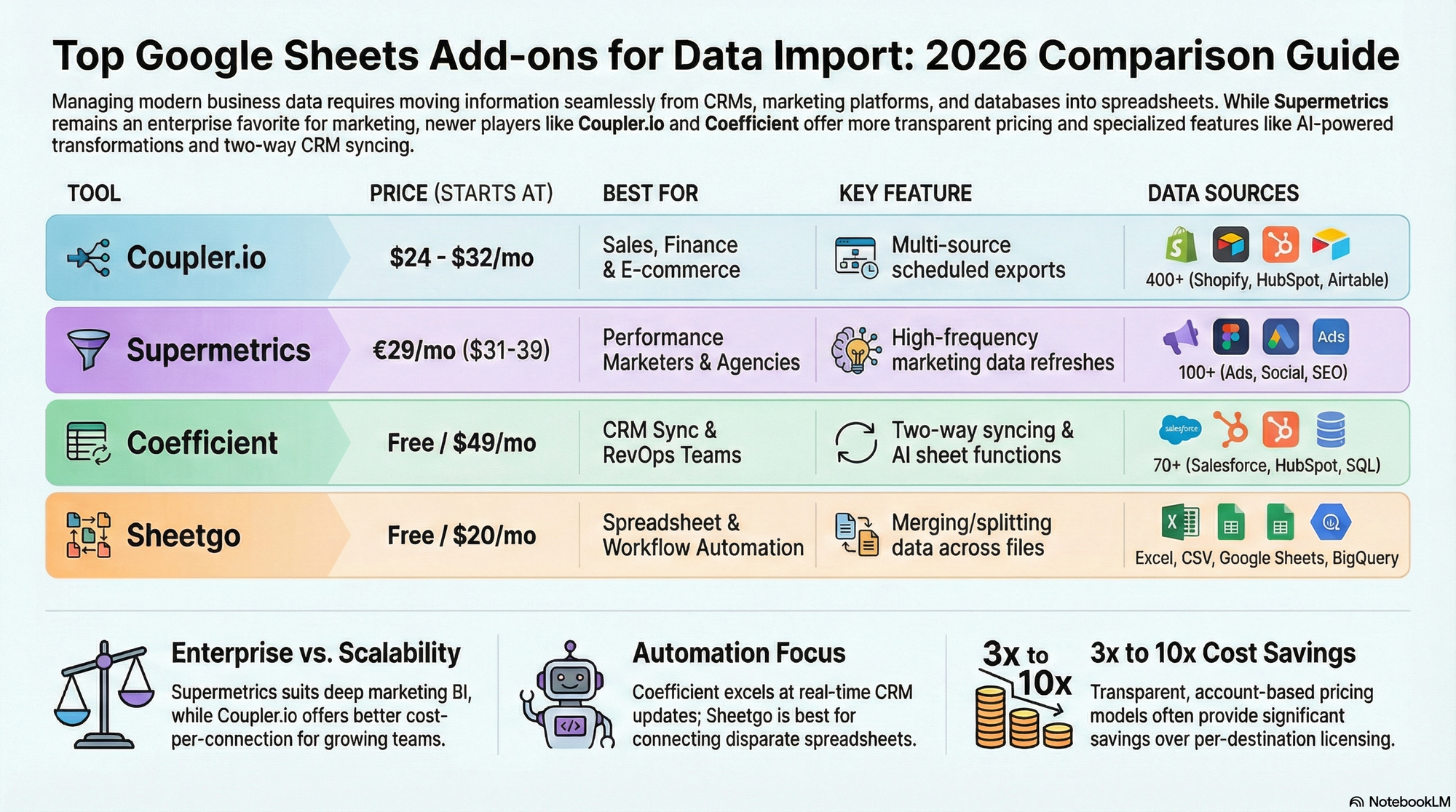
7 Best Google Sheets Add-ons for Data Import
I've organized this list by use case rather than a strict ranking because the "best" add-on really depends on what you're importing. A marketing analyst pulling Google Ads data has completely different needs than an operations manager importing 500,000-row CSV files.
That said, here's my honest take on each tool — including the limitations.
1. SmoothSheet — Best for Large CSV & Excel Imports
Best for: Importing large CSV and Excel files without browser crashes
Pricing: $9/month flat (no per-user or per-row fees)
Website: smoothsheet.com
If you regularly import CSV or Excel files into Google Sheets, you've probably hit the frustration point: your browser freezes, the tab crashes, or Google Sheets just silently fails on anything over 50MB. SmoothSheet solves this with server-side processing — your file gets processed on their servers and streamed into your spreadsheet, so your browser never has to handle the heavy lifting.
It handles files over 100MB without breaking a sweat, and the flat $9/month pricing means you're not penalized for importing more data. There's no per-row fee, no tiered plans to navigate — just one price. If you're regularly uploading large CSVs to Google Sheets, it's purpose-built for exactly that.
Key features:
- Server-side processing for 100MB+ files
- Works directly inside Google Sheets as an add-on
- No browser crashes or tab freezes
- Simple flat pricing — no surprises
Limitations: SmoothSheet is laser-focused on file imports (CSV, Excel). It doesn't connect to marketing APIs or CRM platforms. If you need to pull data from Salesforce or Google Ads, you'll want one of the other tools on this list.
Verdict: The best option for teams that regularly deal with large file imports. The pricing is the most straightforward on this list, and it does its one job exceptionally well.
2. Supermetrics — Best for Marketing Data
Best for: Marketing teams and agencies pulling data from advertising platforms
Pricing: Starts at ~$29/month (Starter), ~$159/month (Growth), ~$399/month (Pro)
Website: supermetrics.com
Supermetrics is the gold standard for marketing data integration. With connections to over 150 marketing platforms — Google Ads, Facebook Ads, LinkedIn, TikTok, HubSpot, and more — it's what most serious marketing teams use to automate their reporting in Google Sheets.
The add-on lets you build custom queries with granular control over dimensions, metrics, date ranges, and filters. It also includes data blending to combine data from multiple sources in a single query, plus pre-built templates for common marketing reports.
Key features:
- 150+ marketing platform connectors
- Granular data extraction with custom queries
- Data blending across sources
- Pre-built marketing report templates
Limitations: Supermetrics is expensive, especially once you need multiple destinations or data sources. The per-destination pricing model adds up fast, and the learning curve can be steep for non-technical users. Small teams often find it overkill.
Verdict: If marketing data is your primary need and budget isn't a hard constraint, Supermetrics is the most mature and comprehensive option. Agencies managing multiple client accounts get the most value here.
3. Coefficient — Best for Live CRM Data
Best for: RevOps, Sales, and Finance teams needing bi-directional CRM sync
Pricing: Free tier available, Starter $49/month, Pro $99/user/month
Website: coefficient.io
Coefficient stands out because it doesn't just pull data into Sheets — it pushes changes back. Its two-way sync lets you update records in Salesforce, HubSpot, or other CRM systems directly from your spreadsheet. For RevOps and sales teams who live in spreadsheets but need their CRM to stay current, this is a game-changer.
The add-on connects to 70+ data sources, includes an AI copilot that helps you build formulas and write queries, and offers scheduled auto-refreshes to keep your data current. We've written a detailed SmoothSheet vs. Coefficient comparison if you want to see how the two tools differ in approach.
Key features:
- Bi-directional sync (write back to CRM from Sheets)
- 70+ data source connectors
- AI copilot for formula assistance
- Scheduled auto-refresh
Limitations: The per-user pricing on the Pro plan makes it expensive for larger teams. It also has fewer connectors than Supermetrics for marketing-specific platforms, and the free tier is quite limited in terms of sync frequency.
Verdict: The best choice if you need data to flow both ways between Sheets and your business systems. The write-back capability is genuinely unique among Sheets add-ons.
4. Coupler.io — Best All-in-One Data Platform
Best for: SMBs and agencies wanting a unified data export platform
Pricing: Starter $24/month, Active $99/month, Pro $199/month
Website: coupler.io
Coupler.io positions itself as an all-in-one data integration platform with over 400 source connections. What sets it apart is that it's not just a Google Sheets add-on — it's a web-based platform that can export data to Sheets, Excel, BigQuery, and BI tools like Looker Studio.
The automated refresh scheduling (minimum 15-minute intervals) keeps your reports up-to-date, and its data stitching feature lets you combine data from multiple sources into unified reports. For a deeper look at how it compares specifically for CSV imports, check out our SmoothSheet vs. Coupler.io comparison.
Key features:
- 400+ data source connectors
- Multi-destination support (Sheets, Excel, BigQuery, Looker Studio)
- Automated refresh scheduling
- Data stitching across sources
Limitations: Coupler.io operates in batch mode only — there's no real-time or streaming option. The 15-minute minimum refresh interval means it's not ideal for dashboards that need live data. Pricing also escalates quickly as you add more data flows.
Verdict: A solid middle ground between simplicity and power. Best for teams that need to pull from many different sources into multiple destinations, not just Google Sheets.
5. Sheetgo — Best for Spreadsheet-to-Spreadsheet Workflows
Best for: Operations and Finance teams consolidating data across multiple spreadsheets
Pricing: Professional ~$22/month, Business ~$79/month
Website: sheetgo.com
Sheetgo takes a different approach than most tools on this list. Instead of connecting to external APIs, it specializes in connecting spreadsheets to each other — merging, splitting, and transferring data between Google Sheets, Excel, and CSV files automatically.
Think of it as workflow automation specifically for file-based data. If you have ten regional managers each maintaining their own spreadsheet and you need to consolidate everything into a master sheet, Sheetgo automates that. For a head-to-head breakdown, see our SmoothSheet vs. Sheetgo comparison.
Key features:
- Merge/split/filter across multiple spreadsheets
- Automated workflow transfers on schedule
- Works with Google Sheets, Excel, and CSV files
- Visual workflow builder
Limitations: Sheetgo has very limited SaaS API connectors. If you need to pull from Salesforce, Google Ads, or databases, this isn't the tool. It's strictly for file-based and spreadsheet-based workflows.
Verdict: Perfect for organizations with complex multi-spreadsheet workflows. If your data already lives in spreadsheets and you need to consolidate or distribute it, Sheetgo handles that elegantly.
6. Two Minute Reports — Best Budget Option for Marketers
Best for: Freelancers and small agencies needing affordable marketing reports
Pricing: Lite $9/month, Basic $49/month, Pro $99/month
Website: twominutereports.com
Two Minute Reports (TMR) offers a more affordable alternative to Supermetrics for marketing data. With 30+ connectors covering the major advertising platforms, its "Speedboost" technology delivers faster query results, and its library of 100+ white-label templates means you can set up professional-looking reports in — well, close to two minutes.
The Lite plan at $9/month makes it accessible for freelancers who need Google Ads and Facebook Ads data in Sheets without Supermetrics-level pricing. It's not as deep or as wide as Supermetrics, but for basic marketing reporting it covers the essentials.
Key features:
- 30+ marketing platform connectors
- Speedboost technology for faster queries
- 100+ white-label report templates
- Budget-friendly entry price
Limitations: Fewer integrations than Supermetrics (30 vs. 150+). No data warehousing options, no advanced data blending, and the template-driven approach can feel restrictive for complex custom reports.
Verdict: The best value pick for small teams that need marketing data in Sheets without enterprise pricing. If you only use a handful of ad platforms, TMR gives you 80% of what Supermetrics offers at a fraction of the cost.
7. Zapier — Best for Custom Automations
Best for: Teams needing flexible, custom data workflows from any app to Sheets
Pricing: Free (100 tasks/month), Starter $19.99/month, Professional $49/month
Website: zapier.com
Zapier isn't a traditional Sheets add-on — it's a general-purpose automation platform that connects 7,000+ apps. But its ability to push data into Google Sheets from virtually any trigger makes it one of the most versatile data import options available.
Need a new row in Sheets every time someone fills out a Typeform? Done. Want Shopify order data flowing into a spreadsheet automatically? Easy. Zapier's strength is connecting apps that dedicated Sheets add-ons don't support, using a no-code trigger-and-action builder that anyone can set up.
Key features:
- 7,000+ app connections (largest ecosystem)
- Trigger-based automations (real-time or scheduled)
- No-code workflow builder
- Multi-step Zaps for complex workflows
Limitations: Zapier works row-by-row, which makes it slow and expensive for bulk data imports. Importing 10,000 rows would consume 10,000 tasks from your quota. It also doesn't handle data transformations well — you get raw data as-is, with limited filtering or reshaping options.
Verdict: Best as a complementary tool rather than a primary data import solution. Use it to fill the gaps that specialized add-ons don't cover, especially for niche apps and custom triggers.
Quick Comparison Table
| Tool | Best For | Starting Price | Connectors | Key Feature |
|---|---|---|---|---|
| SmoothSheet | Large CSV/Excel imports | $9/mo | File-based | Server-side processing, no crashes |
| Supermetrics | Marketing data | ~$29/mo | 150+ | Granular marketing queries |
| Coefficient | Live CRM data | Free / $49/mo | 70+ | Bi-directional CRM sync |
| Coupler.io | All-in-one platform | $24/mo | 400+ | Multi-destination export |
| Sheetgo | Spreadsheet workflows | ~$22/mo | File-based | Sheet-to-sheet automation |
| Two Minute Reports | Budget marketing reports | $9/mo | 30+ | Speedboost + templates |
| Zapier | Custom automations | Free / $19.99/mo | 7,000+ | Trigger-based from any app |
How to Choose the Right Add-on
With seven solid options, the decision really comes down to what kind of data you're importing and how often. Here's a quick decision guide:
You import large CSV or Excel files: Go with SmoothSheet. It's the only tool on this list specifically built for handling large file imports without browser crashes. At $9/month with no per-row fees, it's also the most affordable option for file-based imports. Before importing, you can use the free Google Sheets Limits Calculator to check if your data will fit.
You pull data from advertising platforms: Supermetrics if budget allows, Two Minute Reports if you need a more affordable alternative. Both handle the major ad platforms, but Supermetrics offers deeper queries and more connectors.
You need CRM data with write-back: Coefficient is the clear winner. Its bi-directional sync is unique — no other tool on this list lets you update CRM records from within Google Sheets.
You need data from many different sources: Coupler.io's 400+ connectors and multi-destination support make it the most versatile platform for diverse data needs.
You consolidate data across multiple spreadsheets: Sheetgo was built for this exact workflow. If your data already lives in spreadsheets and needs to be merged, split, or redistributed, it's purpose-built for that.
You need to connect a niche or uncommon app: Zapier's 7,000+ app connections mean it probably supports whatever tool you're using, even if none of the specialized add-ons do.
And here's a tip most guides won't tell you: you don't have to pick just one. Many teams use two complementary tools — for example, SmoothSheet for file imports plus Supermetrics for marketing data. Since they solve different problems, there's no overlap or conflict. If you need to split large files before importing, SmoothSheet's free CSV Splitter tool can help with that too.
Frequently Asked Questions
What is the best free Google Sheets add-on for data import?
Coefficient offers the most useful free tier for data import, with basic connectors to popular business tools like Salesforce and HubSpot. Zapier's free plan (100 tasks/month) is another option for light usage, though it's limited to simple one-row-at-a-time imports. For free CSV-related tools, SmoothSheet offers 20 free browser-based CSV tools including analyzers, splitters, and converters — no add-on required.
Can Google Sheets add-ons handle files larger than 100MB?
Most add-ons rely on browser-based processing, which means they hit memory limits around 50-100MB. SmoothSheet is the exception — it uses server-side processing to handle files well over 100MB without browser crashes. If your file exceeds Google Sheets' 10-million-cell limit entirely, you'll need to split it first using a tool like the CSV Splitter.
Is Supermetrics worth the price for small marketing teams?
For small teams or freelancers, Supermetrics can be overkill. Its real value kicks in when you're managing multiple clients, blending data across platforms, or need advanced query controls. If you only use two or three ad platforms, Two Minute Reports gives you similar core functionality starting at $9/month — a fraction of Supermetrics' cost.
Do I need multiple add-ons or just one?
It depends on your data sources. If all your data comes from marketing platforms, a single tool like Supermetrics or Two Minute Reports covers you. But if you import both file-based data (CSV/Excel) and API-based data (CRM, ads), you'll benefit from two specialized tools rather than one mediocre jack-of-all-trades. For example, SmoothSheet for file imports plus Coefficient for CRM data is a powerful combination that still costs less than most enterprise plans.
What's the difference between a data import add-on and IMPORTDATA in Google Sheets?
Google Sheets' built-in IMPORTDATA, IMPORTRANGE, and IMPORTXML functions are free but very limited. They can only pull from publicly accessible URLs, have strict size limits, and offer no scheduling or transformation features. Dedicated add-ons handle authentication, large datasets, automated refreshes, and data from private/secured sources — things the built-in functions simply can't do.
Conclusion
There's no single "best" Google Sheets add-on for data import — the right choice depends entirely on where your data lives and how much of it you're moving. What I can tell you is that in 2026, you shouldn't be manually downloading CSVs and uploading them by hand, or copying and pasting data between spreadsheets.
For large CSV and Excel file imports, SmoothSheet gives you the smoothest experience at $9/month flat — no browser crashes, no row limits, no complicated pricing tiers. For marketing data, Supermetrics or Two Minute Reports have you covered. For CRM sync, Coefficient is unmatched. And for everything else, Zapier fills the gaps.
Pick the tool (or tools) that match your actual workflow, start with the free tiers where available, and stop wasting hours on manual data imports. Your spreadsheets will thank you.